Skip to content

Looker Studio: Efficient data visualization

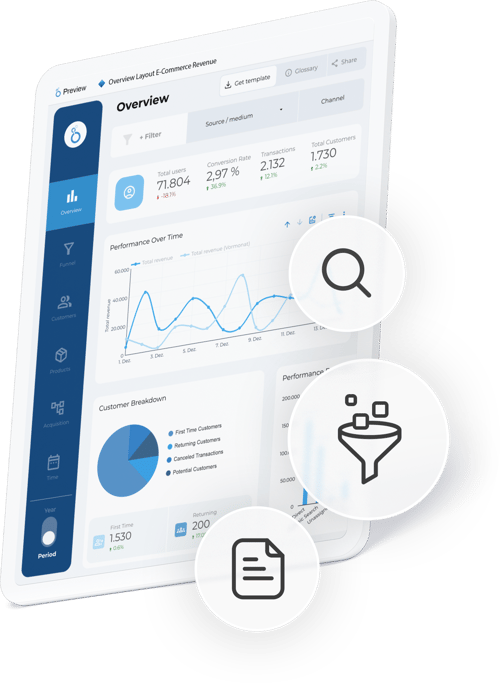
With Looker Studio, Google offers a powerful solution for efficient data analysis and visualization. Use interactive dashboards to make well-founded decisions and keep an eye on your most important key figures at all times.

With Looker Studio, Google offers a powerful solution for efficient data analysis and visualization.

Gain insights & develop strategies with meaningful dashboards

Visualize data with the Looker Studio

Google Looker Studio is a modern business intelligence tool that enables companies to visualize large amounts of data from different sources in real time. It transforms raw data into informative and visually appealing dashboards and reports.

The user-friendly interface, numerous integration options and customizable visualizations make it the ideal platform for data-driven business processes. Functions such as interactive filters, real-time data updates and cross-team approvals ensure maximum flexibility - without any programming knowledge.

For a wide range of industries and applications

Application examples for Looker Studio

With its versatility and flexibility, Looker Studio is suitable for a wide range of industries and use cases. Whether e-commerce, lead generation or corporate management - Looker Studio makes it possible to bundle complex data, present it clearly and evaluate it in a targeted manner. This provides companies with valuable insights for optimizing their strategies and processes.

Icon für das Ladeverhalten in orange

E-commerce & lead generation

Tracking of sales, conversions, returns and leads as well as analysis of efficient traffic sources.

Icon, dass eine Checkliste darstellen soll

Content & Marketing Performance

Analysis of visibility, reach and interactions to measure the success of content.
Icon für Geschäftsprozesse in orange

Business processes &
Controlling

Dashboards and automated reports for KPI, cash flow and budget analysis.

Abbildung eines Icons, dass Kundendaten darstellen soll

HR &
Personnel

Analysis of employee satisfaction, fluctuation and recruiting efficiency.

Icon Logistik in orange

Logistics &
Supply Chain

Monitoring of supply chains, stock levels and transport costs for process optimization.

Icon Kundenservice in orange

Customer support & service quality

Evaluation of tickets, processing times and customer satisfaction.
How we support you with Looker Studio

Our services as a digital agency

As an experienced digital agency, we support you in exploiting the full potential of Looker Studio for your company. With our in-depth expertise and deep understanding of data and analytics, we make complex relationships visible and transform your data into clear, actionable insights.

icon-data-import-burgdigital

Data integration

We seamlessly integrate your data sources such as Google Analytics, CRM, ERP and other systems.

burgdigital-icon-uxdesign

Dashboard design

Development of user-friendly dashboards that clearly visualize important KPIs.

burgdigital-service-piwik-pro-icon-analytics-tool-2

Analysis & optimization

Automated reports support you in making well-founded decisions.

icon-training-burgdigital

Training & Support

We provide training in the use of Looker Studio and are always on hand to provide support.

Efficient data integration and individual dashboard design

Central functions of Looker Studio

Looker Studio enables the integration and analysis of data from various sources such as Google Analytics, Google Ads, social media platforms, CRM systems or CSV files. Thanks to the user-friendly interface, user-defined dashboards can be created and visualized with charts, tables or interactive world maps. Real-time data integration, interactive filters and automated reports facilitate in-depth analyses.

User-friendly dashboard creation

With the intuitive drag-and-drop interface, you can customize dashboards both in terms of content and corporate design and thus present your data in a targeted manner.

Data integration and embedding

Looker Studio combines data from Google tools such as Analytics and Ads as well as external sources such as MySQL, social media or CSV files. The dashboards created can be integrated directly into websites or intranets to make them available to teams or external partners.

Visualization and templates

A variety of chart types such as bar, line or pie charts as well as ready-made dashboard templates enable the flexible and quick creation of clear diagrams for different use cases.

Automated report generation

Reports are updated automatically and can be sent to stakeholders on a regular basis. This eliminates time-consuming manual processes.

API support

The Looker Studio API enables the automation and migration of assets, which makes processes more efficient.

Data analysis, reporting and interactive filtering of data from various interfaces

Seamless connection with Google products and numerous third-party sources

What integrations does Looker Studio offer?

Looker Studio offers the possibility to connect a variety of data sources and visualize them in clear and meaningful dashboards and reports. This is done via so-called connectors, which establish the connection between the respective data source and Looker Studio. Thanks to a wide selection of standard, partner and individual connectors, Looker Studio guarantees maximum flexibility in the integration of data sources.

Integration possibilities of Google Looker Studio

Standard connectors

Looker Studio provides a range of free standard connectors that are directly integrated into the platform. These are ideal for creating marketing dashboards or data-driven reports quickly and easily. They allow easy connection to otherGoogle tools, such as

Google Analytics:
For detailed analysis of website traffic and user behavior.

YouTube:
For analyzing video performance and channel statistics.

Google Ads:
For visualizing campaign performance and budget usage.

Google Cloud Services:
BigQuery, for example, which is a powerful data warehouse that enables the integration and storage of complex data.

Partner connectors

In addition, Looker Studio offers over 700 third-party partner connectors that extend the integration of data sources such as HubSpot, Salesforce, Facebook, LinkedIn, Shopify and other systems. This diversity enables companies to integrate data from almost any platform into Looker Studio.

Individual connectors

Looker Studio offers the option of developing your own connectors for specific requirements. This means that company-specific data sources or internal systems can be seamlessly integrated to create customized solutions.

Experienced & competent

burgdigital - Your Looker Studio partner

Would you like to make your website fit for your digital marketing? We not only know our way around Looker Studio, but are also happy to advise you on other measures and tools. This will help you increase your conversions and give your company a lasting boost.

Use the full potential

Combine Google Looker Studio with other tools

burgdigital-onlinemarketing-google-tools-hero

Google tools

Powerful Google tools help to reach target groups, increase visibility and achieve marketing goals.

csm_Google-Seach-Console_8d39d9ac37

Google Search Console

Tool for monitoring and improving search performance, with comprehensive insights into website performance.

burgdigital-onlinemarketing-google-tools-google-analytics-4-icon

Google Analytics 4

GA4 gives you detailed insights into user behavior, which are crucial for optimizing your website.

Digital expertise - trends &
success stories

Frequently asked questions about Looker Studio & data visualization

FAQ about Looker Studio, dashboards and data visualization

What is Looker Studio and what is it used for?

Looker Studio is a data visualization tool that can be used to clearly prepare and analyse data from various sources in interactive dashboards.

Which data sources can be connected to Looker Studio?

Looker Studio supports numerous data sources such as Google Analytics, Google Ads, Google Sheets, databases and other partner and custom connectors.

For which companies is Looker Studio particularly suitable?

Looker Studio is suitable for companies of any size that want to analyze marketing, sales or company data transparently and make data-based decisions.

What advantages do individual Looker Studio dashboards offer?

Individual dashboards enable a clear KPI overview, automated reporting and target group-oriented preparation of complex data.

How does a professional Looker Studio consultation help?

Professional consulting ensures clean data models, high-performance dashboards, meaningful KPI definitions and a sustainable reporting structure.

Together we realize your visions!

Employee photo
Pia Niemann
Project Manager

pia.niemann@burgdigital.de
Employee photo
Paula Wiersbowsky
Project Manager

paula.wiersbowsky@burgdigital.de