Skip to content

XcR Configurator Interface to HubSpot

XcR Configurator Interface to HubSpot
2:31
Picture of Pia Niemann

The diagram shows the automated workflow between XcalibuR and HubSpot.

Digital product configurators are now a key tool in sales, especially for products that require explanation. They generate valuable configuration data which, without a direct CRM connection, often remains isolated and cannot unfold its full sales potential.

With the XcalibuR interface to HubSpot, burgdigital connects product configuration, CRM, and automation into a seamless digital sales process – enabling automated lead generation and more efficient sales workflows.

XcR configurator–HubSpot interface for direct lead transfer

Configurator inquiries should not remain isolated but move directly into sales. This is exactly where the newly developed XcalibuR interface to HubSpot comes in. It connects the XcalibuR configurator with the CRM and ensures that all relevant data is processed automatically.

User data is systematically created as contacts, while the associated configuration data is mapped as deals in HubSpot. This means every configuration becomes a qualified lead that is immediately available to your sales team.

"Digital configurations must be part of an end-to-end CRM process in order to create real added value."

burgdigital

Automated CRM processes in HubSpot for configurator inquiries

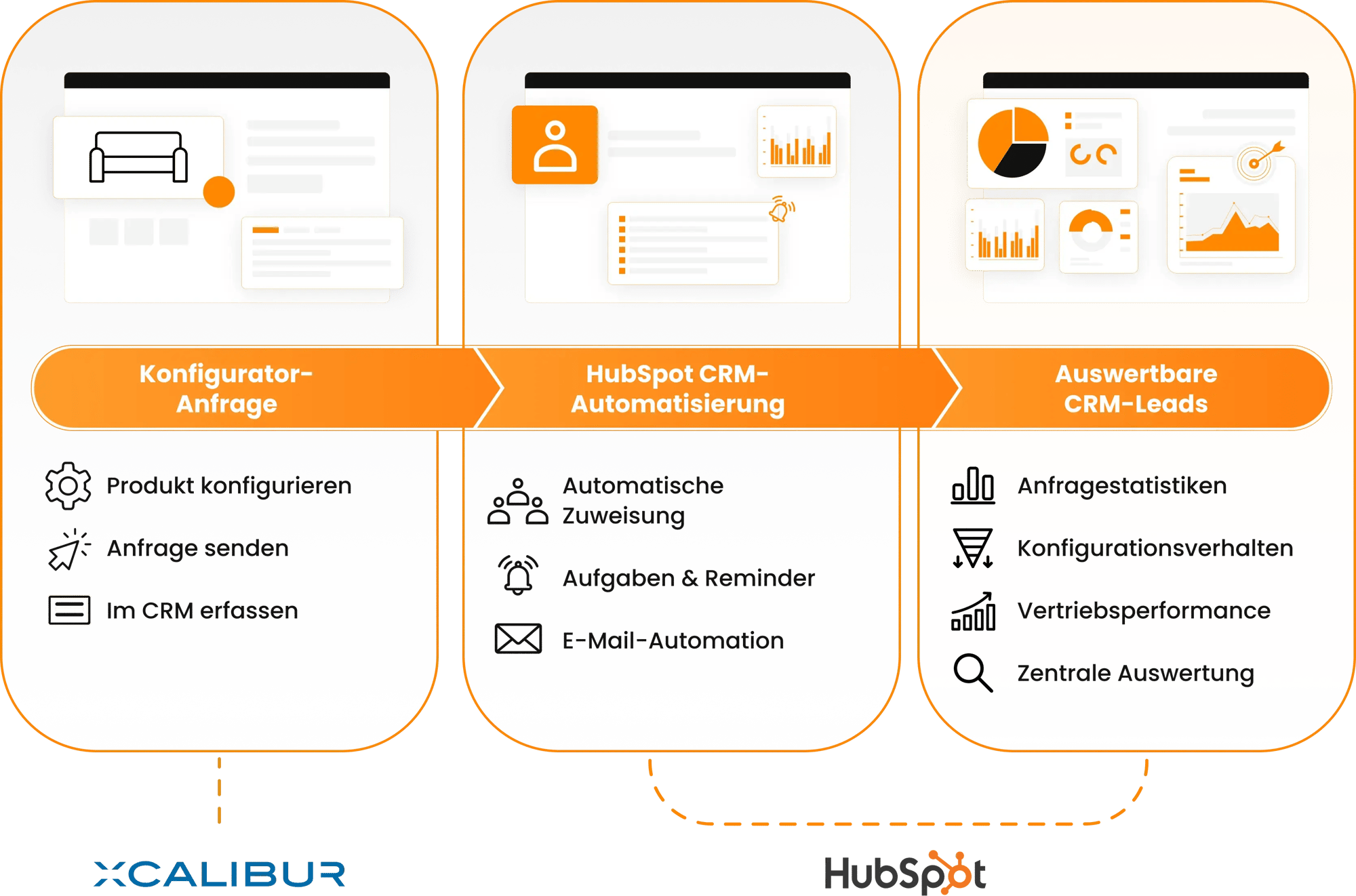
As soon as configurator inquiries are available in the CRM, you can build automated workflows on top of them. Requests can be assigned directly to teams or individual employees, trigger tasks and reminders, or initiate automated email communication.

The result is clearly structured workflows, faster response times, and a consistent handling of every inquiry – without any additional manual effort.

The information image shows the automated process of configurator request, HubSpot CRM automation, and selectable CRM leads.

CRM dashboards and reporting for configurator leads in HubSpot

With the direct CRM integration, configurator inquiries are not only processed but also fully analyzable. All requests generated via XcalibuR are centrally available in HubSpot and can be evaluated there.

Custom dashboards make inquiry statistics visible and provide insights into demand, configuration behavior, and sales performance. This turns every configuration not only into a lead, but also into a valuable data source for optimization and steering.

Flexible HubSpot interface for custom configurator use cases

Not every business model follows the same logic. That is why the interface is designed to adapt flexibly to existing processes.

What this looks like in practice can be seen in the UrbanDesign use case: there, configurator inquiries are not created as deals but as tickets in HubSpot – precisely aligned with internal workflows.

Custom HubSpot interface for XcalibuR by burgdigital

With the XcR configurator interface to HubSpot, burgdigital expands its service portfolio with a proprietary integration solution for digital configurator and sales projects. The focus is not only on the technical connection, but on the intelligent alignment of configuration, CRM, and processes.

burgdigital supports companies from the initial concept through implementation to the fine-tuning of the HubSpot logic – with the goal of systematically turning configurator inquiries into qualified leads and sustainable sales success.

Ready for automated configurator leads in HubSpot?

See in a live demo how configurator inquiries automatically turn into structured leads in HubSpot.

FAQ – XcalibuR configurator interface to HubSpot

How are configurator inquiries represented in HubSpot?

Contact details from the XcalibuR configurator are automatically created as contacts in HubSpot. The associated configuration data is structured as a deal or ticket, or – depending on your requirements – set up as custom objects.

Can the interface be adapted to existing HubSpot processes?

Yes. The XcR configurator interface is individually tailored by burgdigital to your existing workflows, team structures, and automations, and integrates seamlessly into your current HubSpot setup.

What automations are possible after the data is transferred to HubSpot?

After a configurator inquiry is received, you can trigger automatic assignments to employees or teams, create to-dos and reminders, and start email communication with prospects.

Can the XcR interface also be used in other ways?

Yes. In addition to the classic deal logic, the interface can also support alternative scenarios, such as creating tickets in HubSpot – as already implemented for Urban Design – or using dedicated custom objects.

What services does burgdigital provide during implementation?

burgdigital develops and implements the interface, defines the right processes together with the client, and supports the optimal use of HubSpot for configurator inquiries – from technical integration through to process logic.