Skip to content

Customer surveys & feedback analytics with HubSpot

Customer surveys & feedback analytics with HubSpot
0:14
Picture of Pia Niemann

Graphic of a man and a woman working in customer support

Customer feedback is becoming a crucial success factor: HubSpot captures feedback along the entire customer journey, analyzes it automatically, and shows where processes and customer experiences can be specifically improved.

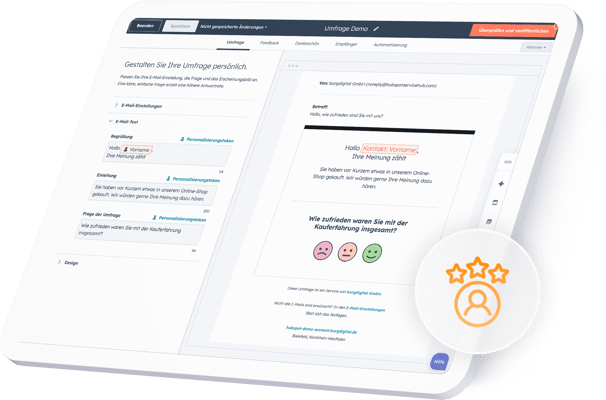
Persuasive power through genuine customer feedback

In today's digital marketplace, it's crucial to adopt the customer's perspective. Feedback surveys are more than just an analysis tool – they provide a direct link to the expectations and needs of your target audience. HubSpot consolidates this knowledge across all relevant touchpoints, creating the foundation for data-driven decisions.

Key features of HubSpot's feedback software

HubSpot's customer feedback software provides companies with a central tool for systematically collecting and analyzing feedback. It supports common survey formats such as NPS (Net Promoter Score), CSAT (Customer Satisfaction Score), and CES (Effort). Direct CRM integration creates a comprehensive view of customer experiences – without the need for additional tools or complex data imports.

Seamless data foundation

All answers are automatically fed into the CRM and are immediately available in the customer context.

Flexible control

Surveys can be precisely targeted to specific customer groups, events, or channels.

Quick findings

Dashboards condense the results into meaningful visualizations for informed decisions.

Dashboard der HubSpot Feedback-Software mit Kundenumfrage und NPS-Score-Visualisierung auf Laptop

How can I create and analyze customer surveys with HubSpot?

Surveys can be created in the Service Hub with just a few clicks. Questions are compiled, target groups defined, and distribution rules set via the intuitive drag-and-drop interface. Analysis takes place directly in HubSpot: charts, filters, and reports make trends immediately visible – for quick insights without manual effort.

Advantages of feedback software for customer satisfaction

Feedback at relevant touchpoints provides valuable insights: Companies identify strengths and weaknesses early on, optimize processes in a targeted manner, and measurably increase satisfaction. Decisions are based on verifiable data points – instead of assumptions.

Identify relevant touchpoints

Whether after a purchase, a support request or consultation – feedback is gathered exactly where it provides the greatest insights.

Making strengths and weaknesses visible

Rückmeldungen zeigen, welche Prozesse reibungslos funktionieren und wo Kunden Hürden erleben. So lassen sich Verbesserungen gezielt umsetzen.

Increase customer satisfaction

With data-driven measures, companies continuously optimize their customer journey and create a positive customer experience.

Die Vorteile der Hubspot Feedbackumfragen umfassen unter Anderem Stärken und Schwächen sichtbar machen und die Steigerung der Kundenzufriedenheit

How do I set up customer feedback software in HubSpot?

Setting it up in the Service Hub is done in just a few steps. Choose the format, define the target group and shipping rules, customize the branding – and you're done. The tool is then ready to use in the CRM.

1. Activate module

Enable the feedback module in the Service Hub

2. Choose survey format

Select NPS, CSAT or CES to suit your goal

3. Target group & shipping rules

Define recipients, set triggers and times

4. Branding anpassen

Adopt CI/CD: Design, language, layout

5. Start & Monitoring

Publish, monitor dashboards, check KPIs

Does HubSpot offer templates for customer satisfaction surveys?

For a quick start, HubSpot offers pre-built survey templates that can be customized – from design and language to question types. This creates a flexible foundation for companies that want to streamline their feedback processes. It saves setup time and enables surveys that perfectly match your communication style.

Create automated surveys with HubSpot

HubSpot allows you to automatically link surveys to specific events – such as after a purchase or the completion of a support request. The results are displayed in real time in clear dashboards and can be linked to existing KPIs. This gives teams a constant overview of customer satisfaction and enables them to respond effectively to feedback.

Implementation with burgdigital

As a certified HubSpot partner, we ensure that customer feedback is collected in a structured manner, professionally evaluated, and used in a targeted way.

Technical equipment

We handle the technical setup and configuration, develop suitable survey formats with the right triggers, and integrate the results directly into CRM, reporting, and automations. Based on this, we derive concrete measures for sales, marketing, and service.

Integrate feedback into the process

This way, feedback becomes an integral part of your touchpoints - for continuous improvements throughout the entire customer journey.

FAQ - Frequently Asked Questions about Customer Feedback

What survey formats does HubSpot's customer feedback software offer?

HubSpot supports the most common formats: Net Promoter Score (NPS), Customer Satisfaction Score (CSAT), and Customer Effort Score (CES). This allows companies to measure customer willingness to recommend, as well as customer satisfaction and effort.

Can I customize HubSpot surveys?

Yes, surveys can be flexibly configured in terms of design, language, and question types. Templates make it easier to get started and can be adapted to your own communication style.

How is customer feedback evaluated in HubSpot?

All feedback is automatically saved in the HubSpot CRM. Dashboards and reports enable rapid analysis and show trends in real time.

Can HubSpot customer surveys be automated?

Yes, surveys can be linked to specific events – for example, after a purchase, a support request, or a closed ticket.

How does HubSpot's feedback software increase customer satisfaction?

By gathering feedback at relevant touchpoints, companies can identify optimization potential early on. This forms the basis for improving processes and strategically developing the customer journey.

How do I set up the HubSpot customer feedback software?

The setup is straightforward and takes only a few steps: activate the module, select the survey format, define the target group, set the shipping conditions, and customize the branding.

Increased sales through improved customer satisfaction

Customer surveys only deliver added value if the results are systematically analyzed and consistently used. HubSpot allows you to automate and analyze feedback processes and directly integrate them into marketing, sales, and service. Let us assess how you can effectively translate customer feedback into measurable improvements.